Written by: Jake Drutchas, Co-founder, CEO, Lodg
Key Takeaways For After-Hours Maintenance Workflows
-
Most property management companies lack a written protocol for after-hours maintenance calls, which creates inconsistent triage and no record of decisions.
-
An effective after-hours maintenance answering service must handle structured intake, urgency triage, self-cure guidance, text-first dispatch, escalation, and work order documentation.
-
Operators should design a clear emergency triage protocol with objective criteria and a defined vendor hierarchy before selecting a coverage model.
-
Call answering services, virtual team members, AI receptionists, and execution layers differ in consistency, escalation reliability, PMS integration, and ownership of the next step after the call ends.
-
Human-staffed models, including call answering services and virtual team members, depend on someone being available to pick up, so coverage gaps appear exactly when call volume spikes.
-
Lodg is the AI execution layer that runs the full after-hours maintenance workflow end to end on top of existing PMS platforms.
See Lodg Run Your After-Hours Workflow
What An After-Hours Maintenance Answering Service Does For Property Managers
It is 2 a.m., your phone lights up, and a tenant says water is coming through the ceiling. You or another human manager are the answering service, the dispatcher, and the person who still has to run tomorrow’s standup.
An after-hours maintenance answering service for property management takes that call instead. It captures the request, triages urgency, and then either resolves the issue, dispatches the right technician or vendor, or escalates to the on-call team. Every action receives a timestamped record. The strongest services handle all of this without asking a manager to coordinate the next step.
A service that only takes a message and sends an email functions as voicemail with a human voice. The coordination work lands back on you, usually at 7 a.m. when the overnight backlog needs sorting before the day begins. That is the part worth fixing, and it is fixable.
How Property Managers Typically Handle After-Hours Maintenance Requests
A well-designed after-hours maintenance workflow follows seven steps that separate intake, triage, and execution. This structure replaces ad hoc decisions with a repeatable process.
-
The tenant reports the issue by phone, text, or the PMS (property management system) portal.
-
The service answers 24/7 and captures the details: unit number, issue description, location within the unit, when it started, access permission, and callback number.
-
The service asks clarifying questions and prompts for photos to reduce diagnostic callbacks and wrong-crew dispatches.
-
The service triages urgency as emergency, high priority, or routine, based on objective criteria rather than the caller’s framing.
-
The service walks the tenant through a simple self-cure fix when appropriate, such as resetting a breaker or replacing a thermostat battery, before dispatching anyone.
-
The service dispatches the right in-house technician or vendor by text in priority order, so the tech can respond from the field without a phone call.
-
The service escalates if no one responds within the operator’s defined window, keeps the tenant updated, and confirms completion with a work order record.
Most operators today still compress all seven steps into whoever picks up the phone. That load makes triage inconsistent and allows follow-ups to slip. You feel it most on Monday mornings, when the weekend’s loose ends all land at once.
Core Capabilities Of An After-Hours Maintenance Answering Service
A complete after-hours maintenance answering service covers these capabilities from the first call through to the closed work order.
-
Structured intake across call, text, and PMS portal, capturing unit, issue, location, timing, and access in one pass.
-
Clarifying questions and photo prompts to eliminate diagnostic callbacks and reduce first-visit failures.
-
Urgency triage based on objective criteria that separate emergencies from routine requests.
-
Tenant self-cure guidance for simple fixes that do not require a work order or a dispatch.
-
Text-first dispatch to the right technician or vendor in priority order, so they can respond from the field.
-
Escalation if the first contact does not respond within the operator’s defined window, such as 10 or 20 minutes for emergencies.
-
Resident status updates at intake, dispatch, and completion to reduce follow-up calls.
-
Work order documentation with timestamps for every action, creating an audit trail for insurance and compliance.
-
Morning reporting so the team starts the day with a complete picture of overnight activity.
A service that stops at message capture leaves the coordination work with the operator.
How To Build An Emergency Triage Protocol For After-Hours Calls
The biggest gap in most after-hours workflows sits in the decision logic, not the answering. Without a written triage protocol, urgency decisions depend on whoever picks up the phone. That is how a routine clog becomes a 3 a.m. emergency dispatch. The following sample decision tree covers the five most common after-hours emergency categories.
Water Leaks
-
Urgency: Emergency (P1) if water is actively flowing, flooding multiple units, or creating an electrocution risk. Urgent (P2) if contained and not spreading.
-
Immediate action: Instruct the tenant to shut off the supply valve if safely reachable. Dispatch an emergency plumber.
-
Escalation path: If the primary plumber does not respond within 10 minutes, contact the secondary vendor. If no response in 20 minutes, escalate to the on-call manager.
No Heat Or No Cooling
-
Urgency: Emergency (P1) if outdoor temperatures are dangerous, such as below freezing or extreme heat. Urgent (P2) in moderate conditions.
-
Immediate action: Confirm outdoor temperature. For P1, dispatch the HVAC vendor immediately and arrange a temporary workaround, such as a portable heater or fan, within 12 hours if full repair is complex.
-
Escalation path: OnCallClerk’s 2026 triage framework sets a 30-minute response target for no-heat situations below 40°F. If the primary vendor does not confirm within that window, move to the secondary contact.
Lockouts
-
Urgency: Emergency (P1) if a safety concern is involved, such as a child locked inside or a domestic situation. Urgent (P2) for standard lockouts.
-
Immediate action: Verify identity and unit. Dispatch a locksmith or provide lockbox access per the operator’s pre-approved protocol.
-
Escalation path: If no locksmith responds within 30 minutes, escalate to the on-call manager.
Gas Smells
-
Urgency: Emergency (P1) always.
-
Immediate action: Instruct the tenant to leave the unit immediately, call 911, then the gas company, from outside the building. Alert the on-call manager at the same time. Do not dispatch a maintenance technician until the utility company has cleared the building.
-
Escalation path: Immediate. No waiting window applies.
Electrical Hazards
-
Urgency: Emergency (P1) for sparking, exposed live wiring, or burning smell. Urgent (P2) for a tripped breaker with no safety risk.
-
Immediate action: Instruct the tenant to turn off the breaker if safe to do so. Dispatch a licensed electrician. Do not send a general maintenance technician to an active electrical hazard.
-
Escalation path: If the primary electrician does not respond within 15 minutes, move to the secondary vendor and notify the on-call manager.
Escalation windows only work when a real vendor hierarchy sits behind them. Define the maximum response time for each priority tier before the service goes live. For example, do the dispatch within 2 hours for true emergencies, including after-hours and weekends. Then map a primary, secondary, and escalation contact for each trade. Before adding a vendor to that hierarchy, pre-negotiate after-hours availability and response-time commitments.
Comparing Call Answering Services, Virtual Team Members, AI Receptionists, And An Execution Layer
Operators evaluating after-hours coverage today weigh four main models: traditional call answering services, virtual team members, AI receptionists, and an execution layer. The table below compares them on the dimensions that matter most to operators managing 100 to a couple of thousand doors. Focus on who owns the next step after the call ends. Call answering services and virtual team members hand coordination back to the operator, AI receptionists capture and route, and an execution layer carries the workflow through to outcome.
The question that separates these models is simple. What happens when a person is not available to answer? Call answering services and virtual team members depend on a human being free at the exact moment a tenant calls. When that person is on another line, off shift, or already handling a dispatch, the call rolls to voicemail or a queue. The tenant waits, and the emergency sits unanswered until someone is free. AI receptionists and execution layers answer every call at once, so availability stops being the bottleneck.
|
Attribute |
Call Answering Services |
Virtual Team Members |
AI Receptionists |
Execution Layer (Lodg) |
|---|---|---|---|---|
|
Cost Model |
Per minute, per call, or monthly retainer, often with overage fees. |
Monthly retainer per team member, plus setup and management overhead. |
Flat monthly platform fee |
Plans scale with portfolio size and the workflows you use. Book a walkthrough for pricing for your portfolio. |
|
Availability When A Person Cannot Answer |
Limited to the agents on shift. A busy line, a break, or a spike in call volume sends the tenant to voicemail or a hold queue. |
Limited to the team member’s hours and workload. If they are off shift, on another call, or out sick, no one covers the line. |
Answers every call at once, with no hold queue, so availability is not the constraint. |
Answers every call and text at once, then keeps working the request through dispatch and escalation even when no human is available. |
|
Consistency |
Varies by the agent on shift. Scripts help, but judgment calls drift between people and shifts. |
Varies by the individual, their training, and how closely they follow your SOPs. |
Consistent decision-tree execution. An AI configured with a clear protocol triages more consistently than a tired human at 3 a.m. |
Encodes the operator’s SOPs, vendor hierarchy, and emergency rules, and runs the same way every time across every property. |
|
Escalation Reliability |
Depends on the agent reaching a manager by phone, and escalations can stall when no one picks up. |
Depends on the team member’s availability, shift coverage, and familiarity with your vendor list. |
Depends on predefined escalation rules. Accuracy and reliability track with the severity logic configured by the operator. |
Automated escalation with defined windows per priority tier. The system moves to the next contact if no response, then escalates to the on-call manager. On Day 0, Lodg never auto-dispatches and instead triages and surfaces the work order for the manager to approve. |
|
PMS Integration |
Usually none. Messages arrive by email or phone and get re-entered by hand. |
Manual entry into the PMS, with no native connector. |
Integration with PMS platforms is often handled through Zapier, webhooks, or API rather than native connectors. |
Native connectors for AppFolio, Yardi, Rentvine, Buildium, Propertyware, and Rent Manager. Data stays in the system of record, and Lodg works on top of it. |
|
Who Owns The Next Step |
The operator. The service takes a message and the team coordinates dispatch, vendor follow-up, and work order closure. |
The operator. The team member logs the request, and your staff still coordinates the response. |
AI captures and routes, and the operator still coordinates dispatch, vendor follow-up, and work order closure. |
Lodg owns the next step through to outcome or escalation, including intake, triage, self-cure, dispatch, escalation, resident update, and work order documentation. |
Call answering services and virtual team members can answer and capture but often stop at the message. They also stop entirely when no one is free to pick up. AI receptionists capture and route but leave coordination with the operator. An execution layer runs the whole workflow across the systems the operator already uses, from the first call to the closed work order.
Lodg functions as the AI execution layer that sits on top of the PMS and runs the after-hours maintenance workflow end to end. With Lodg’s AI Trust Dial, operators decide which actions Lodg completes on its own and which wait for approval. On Day 0, Lodg never auto-dispatches and instead triages and surfaces the work order for the manager to approve. As trust builds, the operator dials up autonomy for routine dispatch, after-hours self-cure guidance, and vendor follow-up.
Read more about the AI execution layer for property management.
Compare Coverage Models With Lodg
How Much After-Hours Answering Services Typically Cost
After-hours answering services for property management use several pricing models that affect cost per door very differently.
-
Per minute
-
Per call
-
Per door
-
Monthly retainer
-
Hybrid.
Evaluate cost per door and avoided after-hours labor, not just the monthly fee. A service that cuts unnecessary emergency dispatches and reduces morning backlog time often pays for itself well before the invoice arrives. That is money you can point to, not a vague promise about efficiency.
Plans scale with portfolio size and the workflows you use. Book a walkthrough for pricing for your portfolio.
Vendor Evaluation Checklist For After-Hours Maintenance Answering Services
Use these questions to evaluate any after-hours maintenance answering service before signing.
-
How do you handle escalation if the first vendor or technician does not respond within our defined window?
-
How do you document work orders, and where does that record live after the call ends?
-
How do you integrate with our PMS (AppFolio, Yardi, Rentvine, Buildium)? Is it a native connector or a third-party bridge?
-
Can you follow our vendor hierarchy and emergency rules, including primary, secondary, and escalation contacts per trade?
-
How do you handle tenant self-cure guidance for issues like a dead thermostat battery or a tripped breaker?
-
What does morning reporting include, and how is it delivered?
-
How do you handle a gas smell or an electrical hazard specifically? Walk me through the exact steps.
-
Who owns the next step when the call ends? Does your team coordinate dispatch and follow-up, or does that return to us?
-
How do you measure response time and dispatch confirmation time, and can we see that data?
-
Can we set approval rules per workflow, so some actions require manager sign-off while others execute automatically?
-
How do you handle sensitive or upset callers who escalate beyond the maintenance issue?
-
What happens on Day 0 before we trust the system? How do we validate that triage decisions match our standards?
If a provider asks for only your forwarding number and greeting, they are setting up a mailbox, not an operating partner.
How To Measure Whether The Service Is Working
Track performance in these categories after going live so you can see whether the workflow actually improves operations.
-
After-hours calls handled: Total volume captured by the service versus calls that reached voicemail or a team member’s personal phone.
-
Emergency versus routine ratio: OnCallClerk’s 2026 analysis estimates only about 12% of maintenance calls are true emergencies. A false-emergency rate well above that signals a triage protocol that needs tightening.
-
Dispatch confirmation time: The interval from request received to vendor confirmed and scheduled. The 2-hour dispatch benchmark mentioned earlier is the target to measure against.
-
Work orders created: Every after-hours request should produce a documented work order. Gaps indicate intake failures.
-
Tenant self-cure rate: The share of calls resolved without a dispatch. A higher rate means fewer unnecessary vendor callouts and lower after-hours labor cost.
-
Escalation rate: How often the service escalates to a manager or on-call contact. A declining rate over time indicates the vendor hierarchy and triage protocol are working.
-
Units managed per employee: The ultimate operating leverage metric. If the same team is handling more doors with fewer after-hours interruptions, the workflow is working.
Lodg tracks workflow performance over time so the operator can see the change across all of these categories, not just at go-live.
See Lodg’s After-Hours Performance Dashboard
Where Lodg Fits In Your Maintenance Stack
Lodg functions as the AI execution layer that sits on top of the PMS and runs the after-hours maintenance workflow end to end. It connects to AppFolio, Yardi, Rentvine, Buildium, Propertyware, Rent Manager, and others in about five minutes of the operator’s time. At onboarding, Lodg maps the maintenance team structure. That means in-house technicians and third-party vendors, primary, secondary, and escalation contacts for each trade, and the rules for who gets which calls in which situations.
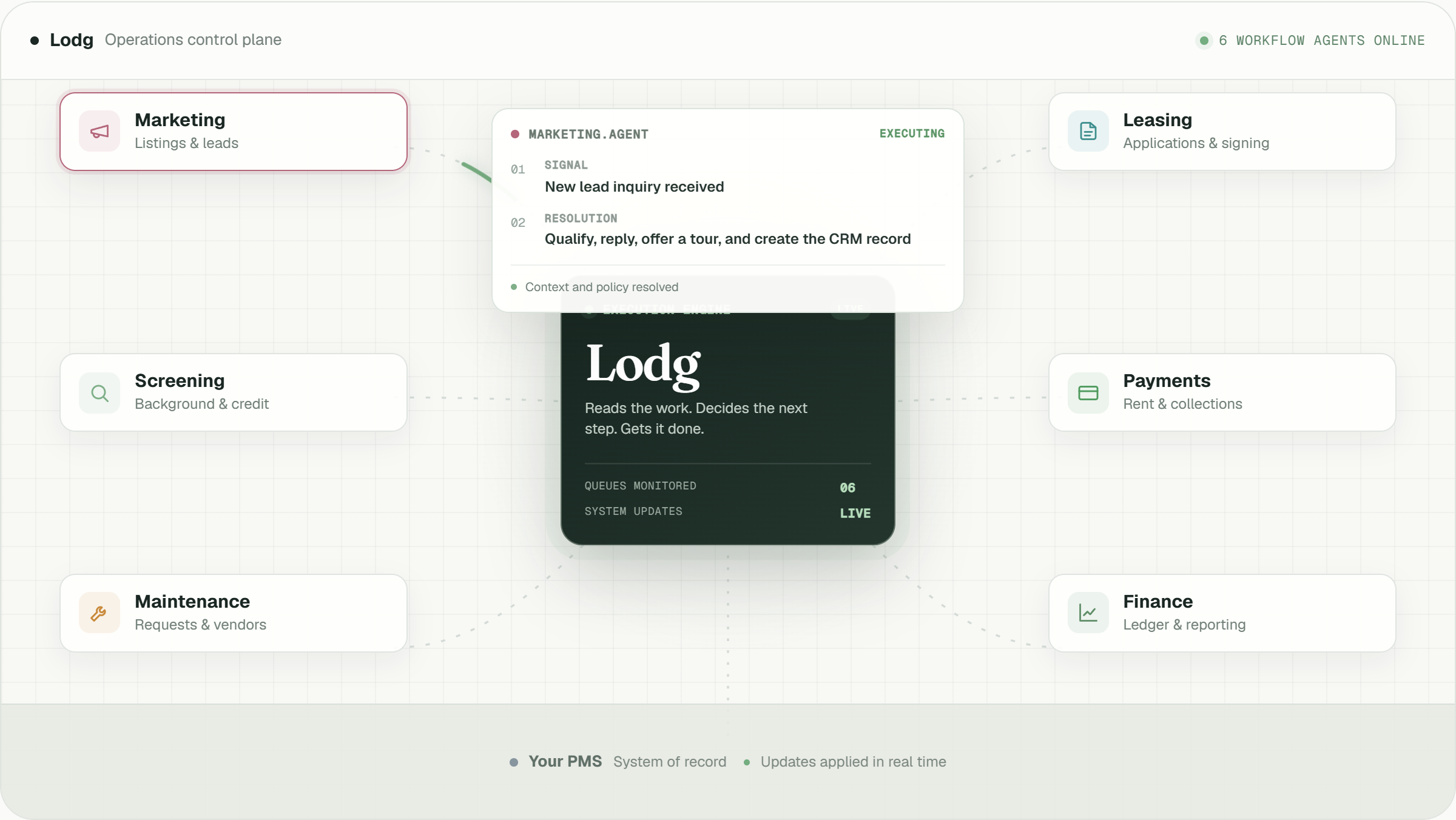
From there, Lodg answers maintenance calls and texts 24/7, captures structured intake, triages urgency, walks tenants through simple fixes, dispatches the right tech by text in priority order, escalates if no one responds within the operator’s window, keeps the tenant updated, and confirms completion. One unified intake queue replaces three inboxes. The team sees exceptions instead of every call.
One operator’s team stopped answering after-hours maintenance calls entirely after going live on Lodg. They saw zero after-hours calls taken by the team, one unified intake queue across call, text, and PMS, and text-first dispatch for both in-house technicians and outside contractors.
Lodg’s maintenance coordination also supports HOA and condo association managers. It can take requests from both tenants and owner-occupants and distinguish association responsibility from owner responsibility.
Looking ahead, Lodg is building toward an AI-native PMS, with a general ledger, accounting, and embedded financial services in development with design partners now.
Conclusion: Use A Workflow-First Approach To After-Hours Coverage
After-hours calls expose gaps in the workflow behind them. Hiring an answering service without fixing triage, escalation, and dispatch simply moves the 2 a.m. call to a different person. You already know how that ends.
The workflow-first approach follows four steps. Map the current after-hours process and find where decisions are inconsistent. Write the emergency triage protocol with objective criteria for each issue type. Build the vendor hierarchy with primary, secondary, and escalation contacts per trade. Then choose the coverage model that executes the workflow rather than just answering the phone.
Operators who follow this sequence stop acting as the dispatcher. Their team stops getting woken up. Nothing falls through the cracks because the workflow owns the next step instead of a single person. That is a realistic outcome, and it starts with one written protocol.
See Lodg run your workflows: